
For YouTube creators
Your YouTube partnerships, from the first offer to the payment.
Orbikit helps you tell whether a brand's offer is genuine, gives you price benchmarks and drafts your replies; once you agree, it tracks the deadlines and the payment. And it watches over your channel every day.
No brand deal yet? Orbikit follows your channel from day one and gets you a media kit and a page where brands can reach you.
Free for one channel and one partnership at a time, with no time limit and no credit card.
- Official YouTube access, no scraping
- Nothing changes on your channel without you
- Hosted in Europe
- No made-up numbers
How it works
-
1
Create your account
An e-mail address and a password, then you confirm the address from the e-mail you receive; or, in one click, your Google account.
-
2
Connect your channel
You allow Orbikit to read your channel's statistics from your Google account. If you later want to change your videos or channel from Orbikit, or answer your comments, Google will ask you for one more permission. You take Orbikit's access back at any time by disconnecting the channel.
-
3
Let Orbikit keep watch
The channel's history is brought in as soon as you connect, then collected every day. You are told when it matters.
What Orbikit does
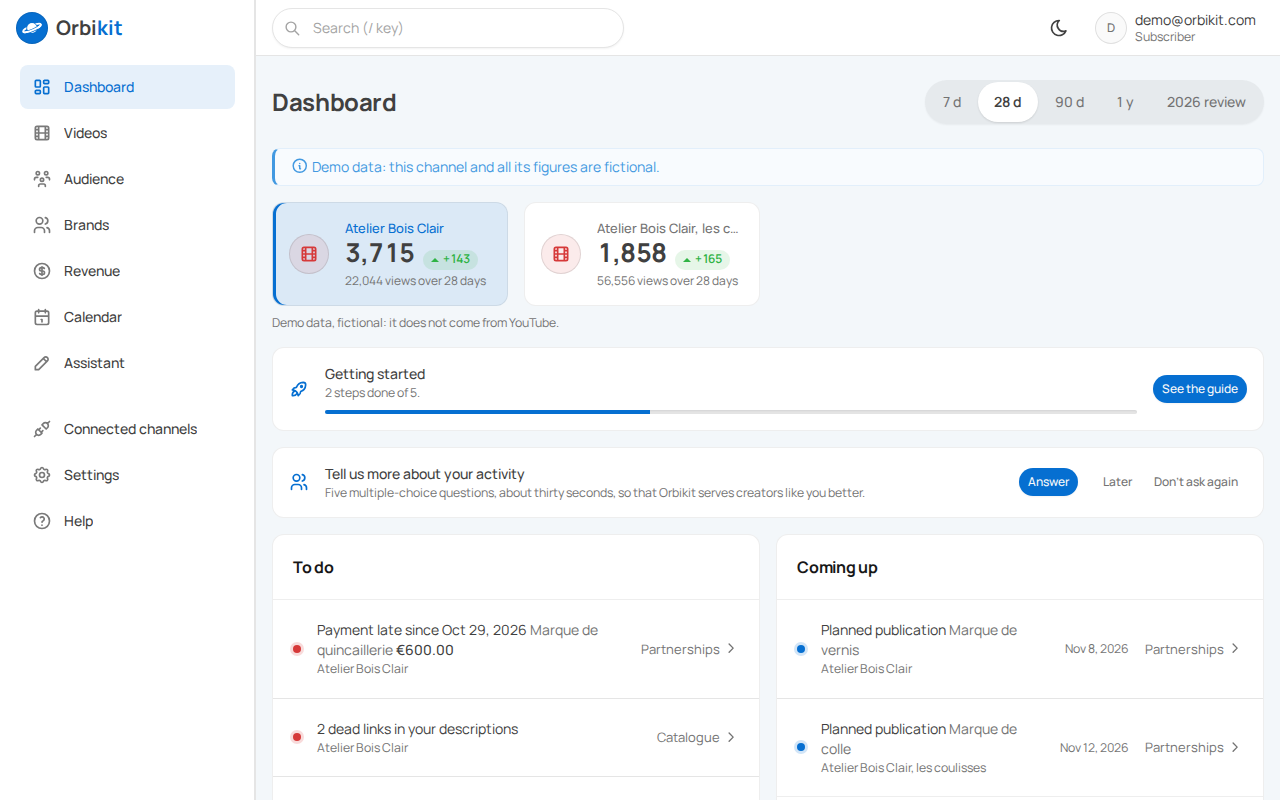
YouTube Studio shows everything, as long as you go and look. Orbikit collects your channel every day, e-mails you when it matters and helps you with brands.
Follow
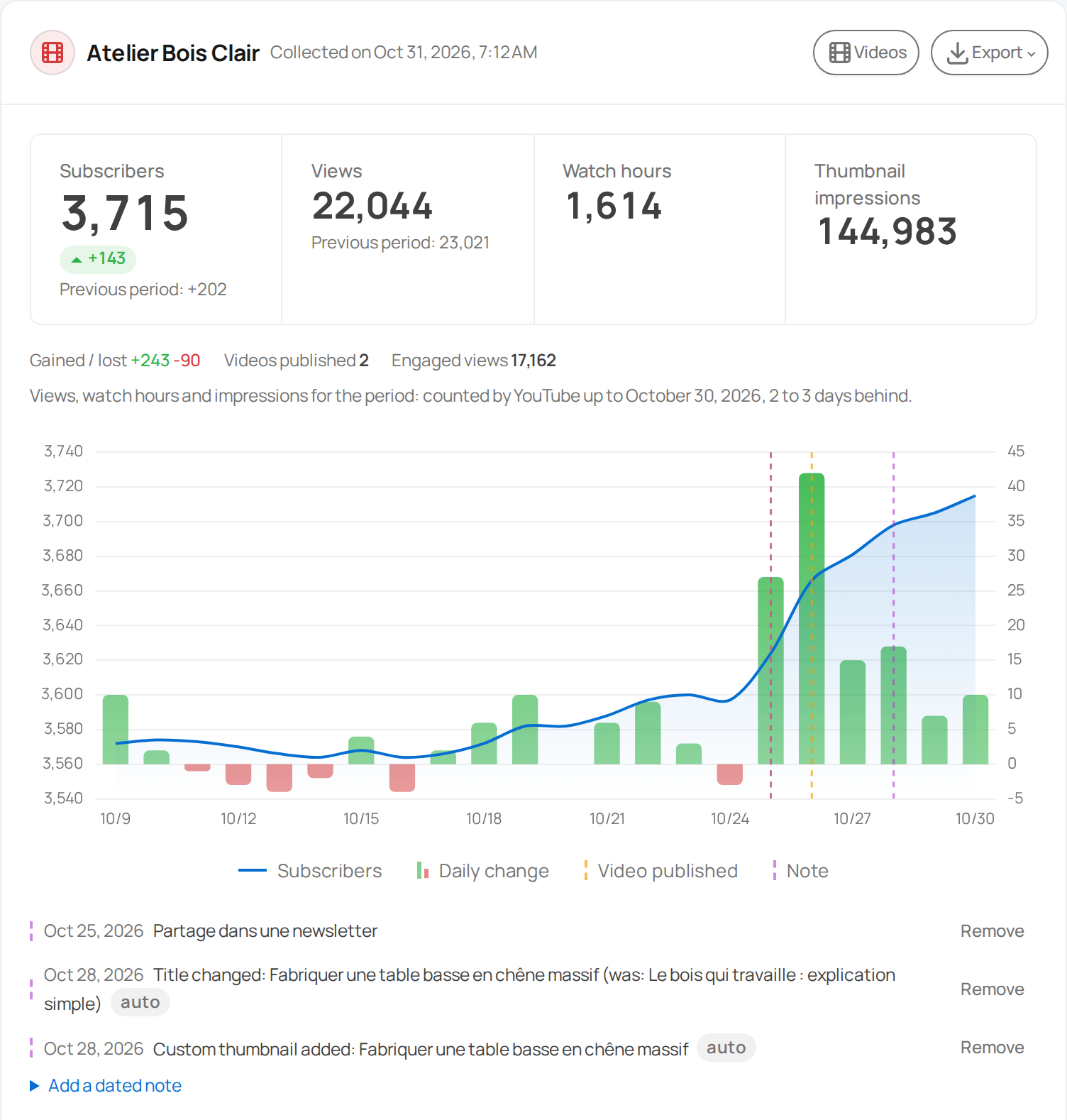
Your channel's whole story, day by day
As soon as you connect, Orbikit brings in the history since the channel was created, then collects it every day.
- Subscribers gained and lost, views and watch time, day by day
- Each video: retention, audience, traffic sources
- Engaged views next to views, since YouTube's new way of counting
- The first 48 hours of a video, hour by hour
- How a video starts compared with your previous ones
And 4 more
- Comparison with the previous period and last year, year in review
- The YouTube searches that bring you views, week after week
- The sites, hashtags and playlists that bring you views, where your impressions come from, the subtitles your viewers turn on, where your videos are shared
- Your series and formats side by side, labelled by you; the cities of your audience
Be told
What moves reaches you by e-mail, what changes stays on record
No need to open the dashboard to know something happened, or to remember what you edited.
- The Monday summary, your week in one short e-mail
- An alert for a spike, a drop, an old video picking up again, a milestone reached
- An e-mail when a new video starts better than your last ten
- How each new video starts, by e-mail after 3 and 7 days
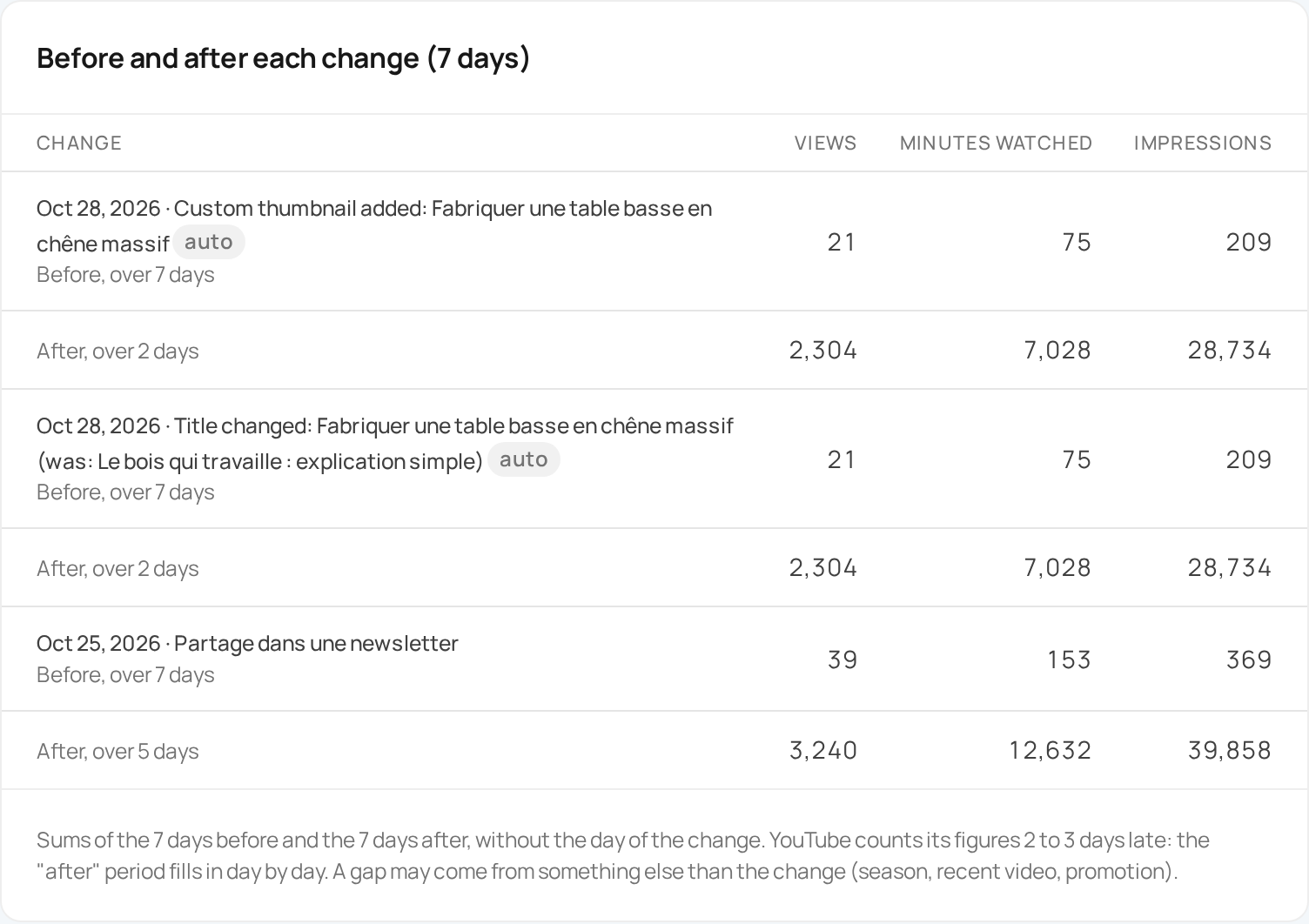
- Every change noted on its own: title, description, tags, chapters, subtitles, a thumbnail added, visibility
And 6 more
- The views and impressions of the 7 days before and after each change
- The change log: every change on the channel, with its before and after
- An alert if the channel's name changes or several videos disappear on the same day
- A calendar: scheduled videos, upcoming live streams, deliveries, payments and contract ends, with a reminder the day before a live stream
- Your alerts also as notifications on your phone or computer, without any figure; Orbikit installs like an app
- Your alerts also announced in Discord or Slack, without any figure
Brand deals
Your brand deals, from the first exchange to the payment
What used to get lost in your inbox: whether an offer is genuine, what to ask and what to answer, then what was agreed, what is left to deliver and what you are owed. Orbikit e-mails you the day before a delivery and when a payment is late.
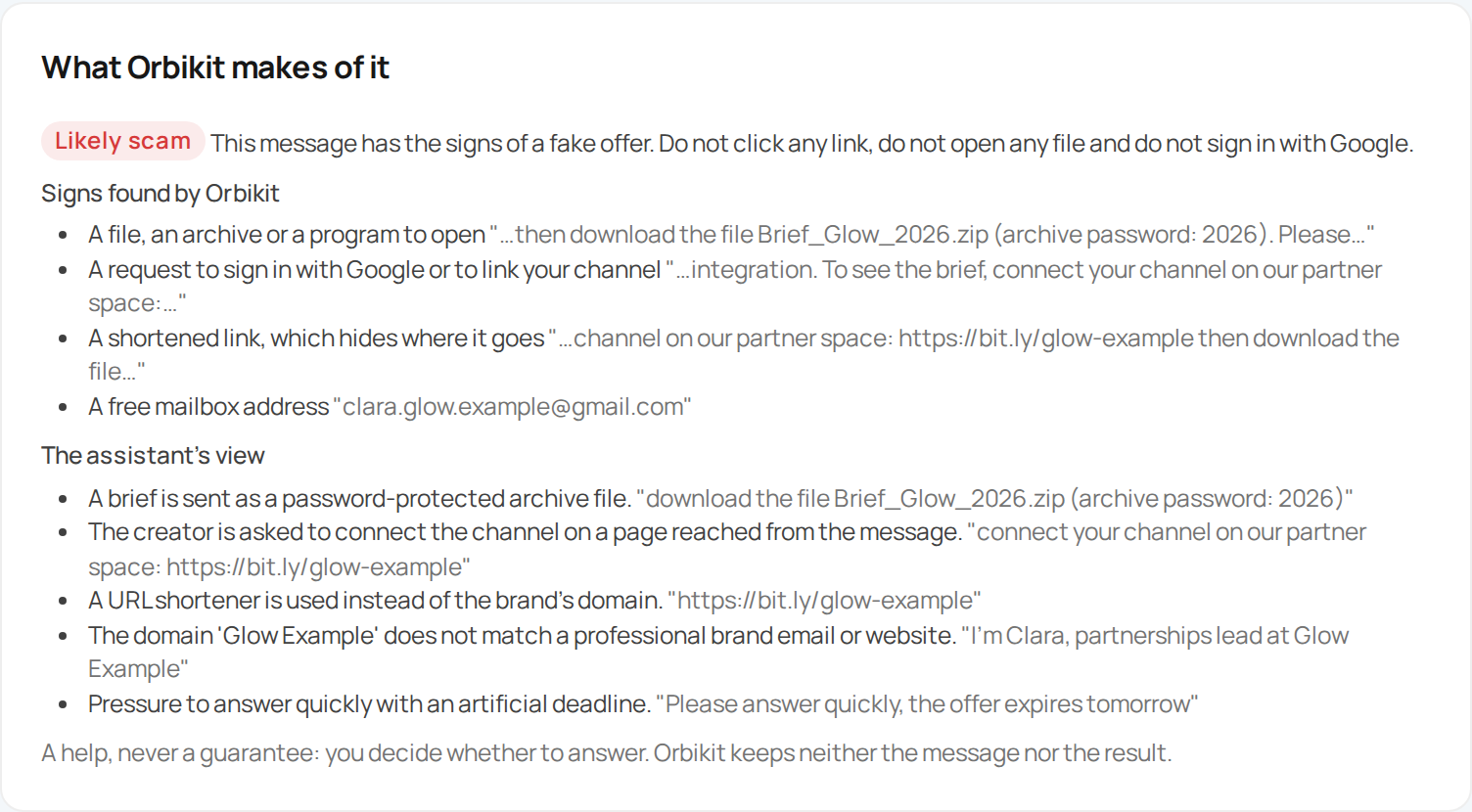
- The signs of a fake offer spotted in a brand's message, and a recently created site flagged
- Benchmarks to set your price, and the forms an offer takes explained: flat fee, price per 1,000 views, guaranteed views, commission
- The assistant gives its view on an offer and drafts your answers: first reply, price, products-only offer, polite no, renewal, payment reminder
- A page where brands send you their offers, and the address of each offer checked
- A PDF media kit with your real numbers and your rate card
And 11 more
- A code in each PDF, which the brand checks online
- A summary of each offer, to send to the brand
- The place of the mention, the views guarantee, the usage rights and the exclusivity noted on each partnership, with a reminder when the rights and the exclusivity end
- Your deliverables on other networks (Reels, TikTok…) noted with the rest, to follow by hand
- The sponsorship disclosure, the "Paid promotion" box, the promo code and the brand's link checked on each video
- The disclosure added in one click, and, on the day you choose, the brand's link removed or replaced
- Tracked links for each partner, with clicks day by day and their QR code
- The report of each sponsored video at D+7, D+30 and D+90 in your inbox, with the sponsored segment on the retention curve: your own figures to review the deal with the brand and prepare the next one
- The amount owed, the deposit, the reminders, and a receipts book in CSV
- The book of receipts and the summary by quarter of your partnerships; your past partnerships imported from CSV
- For a manager: the partnerships and the calendar of every channel entrusted to them, together
Revenue
Your YouTube revenue, month after month
For monetised channels, and only if you want it. Access to revenue is asked for separately, from the Revenue page.
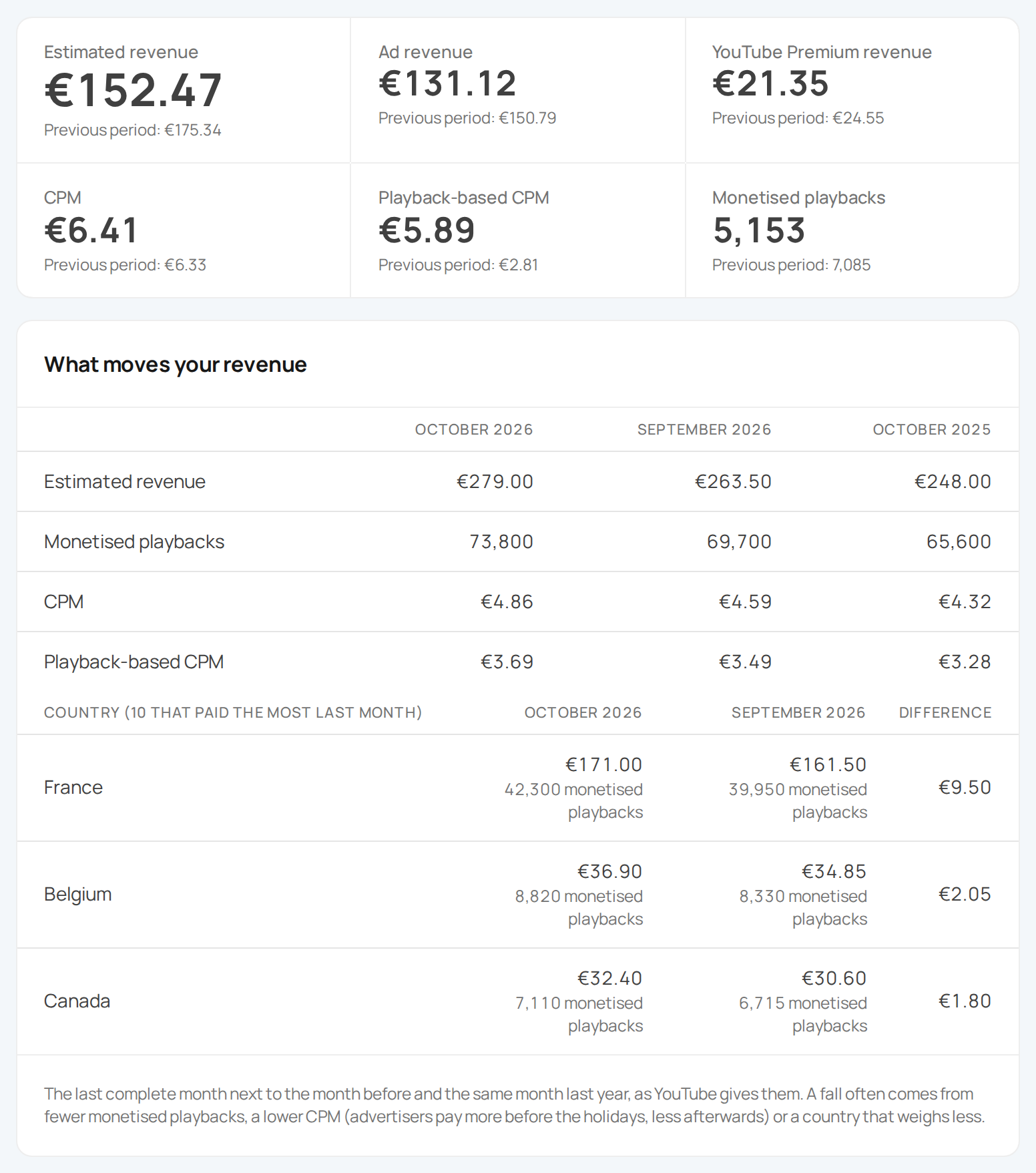
- Estimated revenue, CPM and monetised playbacks, against the previous period
- Month by month, and by format (videos, Shorts, live streams)
- What moves your revenue, against the previous month and last year, country by country
- The videos that earn the most, also ranked by CPM
- CPM by ad type, by country and by format, with what YouTube says moves it
And 5 more
- Your videos of 8 minutes or more, where YouTube allows mid-roll ads, with a link to their setting in Studio
- Your paid partnerships alongside, never added to YouTube's revenue
- An alert when revenue drops sharply
- The activity criteria of the 2027 Partner Program, with an alert
- The Super Chats of your live streams
Catalogue
A tidy catalogue, video by video
Orbikit reads your videos again and shows you what is worth fixing, from the newest to the oldest.
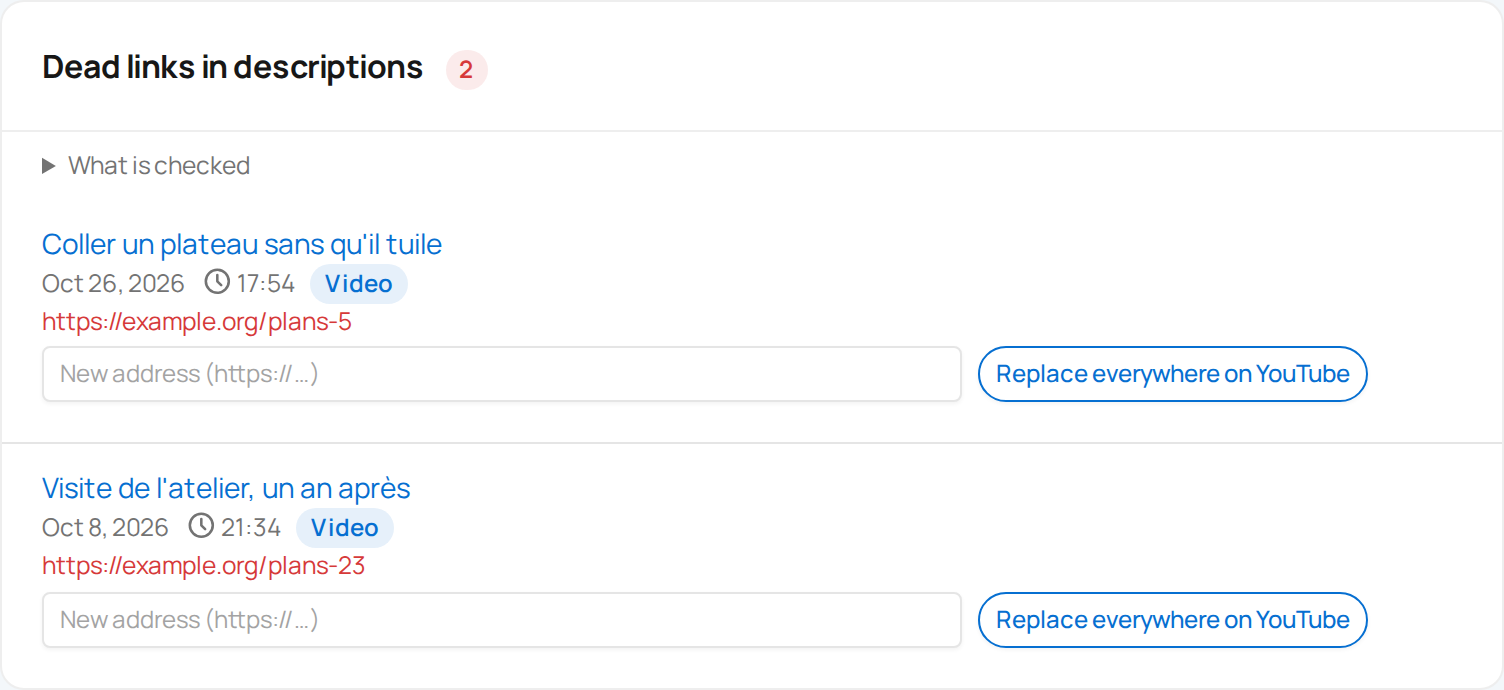
- Dead links in your descriptions replaced in every video that has them, after a check
- Amazon links without an affiliate tag
- Videos with affiliate links and no sponsorship disclosure
- Missing subtitles, chapters, tags or thumbnails, added from Orbikit
- Videos that are in no playlist
And 7 more
- Orbikit links whose destination you change without touching the videos, checked every day
- A common block in all your descriptions, scheduled campaigns, translations, and 30 days to undo
- The settings of your videos and channel, your playlists, your watermark and your channel home page, changed from Orbikit
- Comments left unanswered, handled from Orbikit
- A backup of your titles, descriptions and tags
- Videos that are age-restricted, blocked in some countries, rejected, without an audio language, not embeddable, declared for kids, with ignored hashtags or broken chapters
- The review of the channel itself: description, keywords, trailer, country, language, translations, home page
And also
-
Collaborators
Access for your team, with the rights you choose for each person.
-
Export
Your whole history in CSV or PDF, at any time.
-
Goals
A number of subscribers or watch hours to reach, and what is left to do.
-
Release day
The views of your videos at D+7 by the weekday they came out.
-
Monthly report
The past month in a PDF, on the 1st of each month, if you want it.
-
Writing assistant
Ideas, titles, descriptions, video outlines and messages to brands, from what you write. Hosted in Europe.
-
Title test
Two or three titles, the current one included, tried in turn on a video; at the end the original title comes back, or the one you keep.
-
English and French
The app and the e-mails in your language.
-
Account security
Two-factor authentication, a log of your sign-ins without IP addresses, an e-mail for each unknown browser, sign-out of every device in one click.
Orbikit in action
A full tour of the app in 10 minutes, on a demo channel with made-up numbers.
Chapters
- 0:00 Connect your channel
- 0:30 The dashboard
- 2:18 Your videos
- 3:53 Audience and traffic
- 4:27 Stay informed
- 5:08 Partnerships
- 6:06 Media kit, sponsored report and links
- 6:57 Revenue
- 7:40 The calendar
- 7:59 The writing assistant
- 8:19 Team, subscription and account
- 9:13 Help
Subtitles available in English and French.
Our commitments
-
Kept from day one
Every collected day is kept as long as your Orbikit account is active.
-
No made-up numbers
Only what YouTube provides. A day that could not be collected stays empty, it is never estimated.
-
You stay in control, never sold
Orbikit changes your channel only when you ask, and access tokens are encrypted. Your data only serves the service you use and goes only where you send it, no advertising, no resale.
-
Your revenue, if you want it
Access to revenue is asked for separately and can be removed at any time. Your collaborators only see it if you decide so.
-
One-click deletion
Disconnect a channel or delete your account, your data is erased on our side within 7 days, and from encrypted backups within 31 days. After that only a few traces without content remain, listed in the privacy policy.
-
Hosted in Europe
Your data is stored in the European Union.
Free, with no time limit
One channel tracked every day, with no credit card:
- the channel's history since it was created, and the day-by-day detail of its last 50 videos;
- alerts and the Monday summary;
- the latest changes to your videos and a first catalogue review;
- one partnership at a time, with the page for receiving brand proposals;
- before you answer a brand, the signs of a fake offer, the assistant's view 5 times a month and price benchmarks;
- the media kit, marked "made with Orbikit".
With a subscription: unlimited partnerships, the full change log and catalogue review, revenue, the first 48 hours hour by hour, changes on YouTube, exports and the sponsored video report.
Subscriptions start at €9 a month, with no commitment. If you stop, your account goes back to Free, with its data.
Frequently asked questions
Who is Orbikit for?
YouTube creators who receive or look for brand offers, small channels included: know whether an offer is genuine, what to ask and what to answer, then follow the partnership through to payment. Orbikit also follows your channel every day and tells you when it moves. And managers who follow several creators.
My channel is small, is Orbikit for me?
Yes. According to creators, the first offers come from a few hundred subscribers, and many offer only products, or are fake: Orbikit spots the signs of a fake offer and gives you price benchmarks. Your media kit and a page where brands can write to you are ready from the first exchange. And for your channel: a video that starts better than the previous ones, views before and after a new title, an old video picking up again, a few findings every Monday.
A brand writes to me: how do I know it is genuine?
Paste its message into Orbikit: it spots the signs of a fake offer, such as a file to open, a request to sign in with Google, fees, a free mailbox or a recently created site, then the assistant gives its view, each reason quoted from the message. Never sign in with Google on a link received in an offer: it is the most common way channels get stolen, and Orbikit will never ask you to.
How is it different from YouTube Studio?
YouTube Studio shows your figures and, to channels in the Partner Program, offers a media kit and a place in brands' searches. It does not tell you whether an offer is genuine or what price to ask, and follows neither deliveries nor payment: that is what Orbikit does, which also writes to you when your channel moves and keeps track of each change to your videos. Your collaborators get access without entering your channel.
Do you recover my channel's history?
Yes. On the first collection, we take the views and the subscribers gained and lost day by day since your channel was created. The total number of subscribers is only known from the day you connect the channel.
Do I have to give access to my revenue?
No. Every other feature works without it. Access to revenue is asked for separately, only if you open the Revenue page. You take Orbikit's access back by disconnecting the channel or from your Google account.
Can Orbikit raise my CPM?
No one can promise that: the CPM depends on what advertisers pay. For a monetised channel, the Revenue page shows what YouTube says moves it, with your figures alongside: the season, where your viewers are, ad types, videos of 8 minutes or more and advertiser-friendly content. The settings are then made in YouTube Studio.
Do brands get access to my account?
No. You send them what you choose, as a PDF or by e-mail, with numbers that come from YouTube. YouTube also offers, in Studio, sharing with your partner brands; Orbikit points you to it.
Can I see who unsubscribed?
No. YouTube does not say who unsubscribed, and we only use its official access. You do see how many subscribers you gain and lose each day.
Is my data shared?
No. It is never sold, used for advertising or passed on to third parties. Only our technical providers can access it to run the service, hosting, e-mail delivery and, for the writing assistant, Mistral AI, in the European Union.
What happens if I disconnect my channel?
Access is removed and its data is deleted from Orbikit within 7 days at the latest, and from encrypted backups within 31 days. Nothing is deleted on YouTube: changes already made at your request stay there, and those you had scheduled stop without putting anything back.
Start your history today
Your channel's history as soon as you connect, then a collection every day, for free and with no time limit.
Start for free